The best way to load and use Google Fonts with React, Gatsby and NextJS

Google Fonts are amazing and widely popular on the Internet. Its API makes up 89.28% of the web fonts market share (see source). However, I often noticed that many websites struggle with fetching their fonts and end up render-blocking their website by up to 2 seconds!
So, today I wanted to share the optimal way to load your Google Fonts without affecting your site performance. Let's get started.
Table Of Contents
- How can I check whether fonts affect the performance of my website?
- FontSource (Self-host Google Fonts in neatly bundled NPM packages)
How can I check whether my fonts affect my website's performance?
I think many people might not even realize when loading fonts block the user from accessing their website. One of the most common resources to check this is Google's PageSpeed Lighthouse tool (https://developers.google.com/speed/pagespeed/insights/). If you are having problems with your Google Fonts, it will look like this:
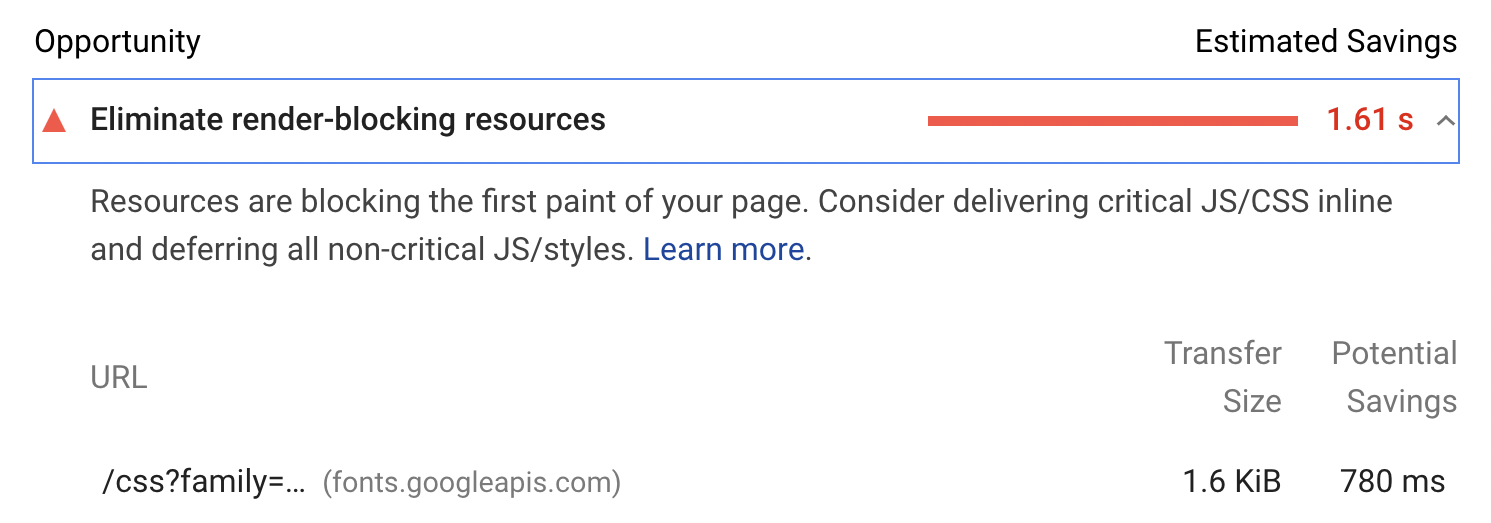
And here, the Google Font API needed a rocking 780ms to load in before elements on the website can be rendered. 780ms are eons for users. Just think of how much time we would steal over time from our users if every user has to wait this long.
FontSource (Self-host Google Fonts in neatly bundled NPM packages)
And this is where FontSource comes in. FontSource lets you self-host your fonts and gets rid of the need to include your fonts as <link rel="stylesheet">. No need to make a call to the Google Font API anymore, but instead have the font assets right in your project.
FontSource essentially bundles open-source fonts like Google's in an NPM package that you can include in your project. All that's left to do is to import your font either in your index.js or in your SCSS file.
FontSource is very easy to configure and comes with great documentation. So, feel free to dive in there or follow the below for a simple implementation.
Let's say we want to include the "Montserrat" font in our project. In 3 steps we are done.
1. Add the package to your project
yarn add @fontsource/montserrat // alternatively npm install @fontsource/montserra
2. Import the font subsets necessary to your project in JavaScript or SCSS.
To further improve performance, FontSource allows you to import subsets of the font to keep the payload small.
In Javascript:
import "@fontsource/montserrat" // Defaults to weight 400.
import "@fontsource/montserrat/900-italic.css" // Italic variant.
or SCSS:
@import "~@fontsource/montserrat/index.css"; // Weight 400.
@import "~@fontsource/montserrat/300-italic.css";
3. Define the font in your CSS, CSS-in-JS etc.
Now you are free to use the font in any place necessary. Whether you would like to reference it in CSS, CSS-in-JS, or SCSS.
body {
  font-family: "Montserrat";
}
And gone are your issues with render-blocking fonts! I hope this helped. This tutorial has been quite simple and straightforward, but looking at the number of slow loading websites that I come across, with fonts loading in being the reason, I just felt like I had to make this post. Feel free to let me know in the comments if you feel the same!
That’s pretty much it!
Thanks so much for reading this far and feel free to reach out to me anytime, on my website or Twitter 🙂 And if you like to read more, make sure to check out my other posts on my blog!
Comments
Join the discussionNice blog, Lars Behrenberg !
I also love your website, it's cool.
Thanks heaps! 😬😅
I would make a share of this blog on twitter Lars Behrenberg
Thanks for writing about Fontsource
Though wouldn't it still be a dependency to download, no matter where it comes from?
Loading from google at-least has its CDN.
What do you think?
It’s still true that the font has to be loaded in. However, because you are self-hosting the font through an npm package, you are not sending a rending blocking network request to the Google font api. Waiting for a api to reply will always take longer than have assets self-host the assets yourself. And that’s why you end up having significant performance gains.